Fince 2.0: accounts, bills, goals and more
Fince 2.0 turns a simple expense tracker into a full picture of your month: accounts, recurring bills, savings goals, debts, a 30 to 90-day forecast, widgets, optional iCloud sync, and how much you can still spend each day. It is still free to start, and your budget still lives on your iPhone.
Fince started with one idea: you should be able to see where your money goes without handing your bank login to anyone. Version 1 did that with quick expense entry, budgets and a monthly overview. Version 2.0 keeps the same promise and fills in everything around it.
Know what's left, every day
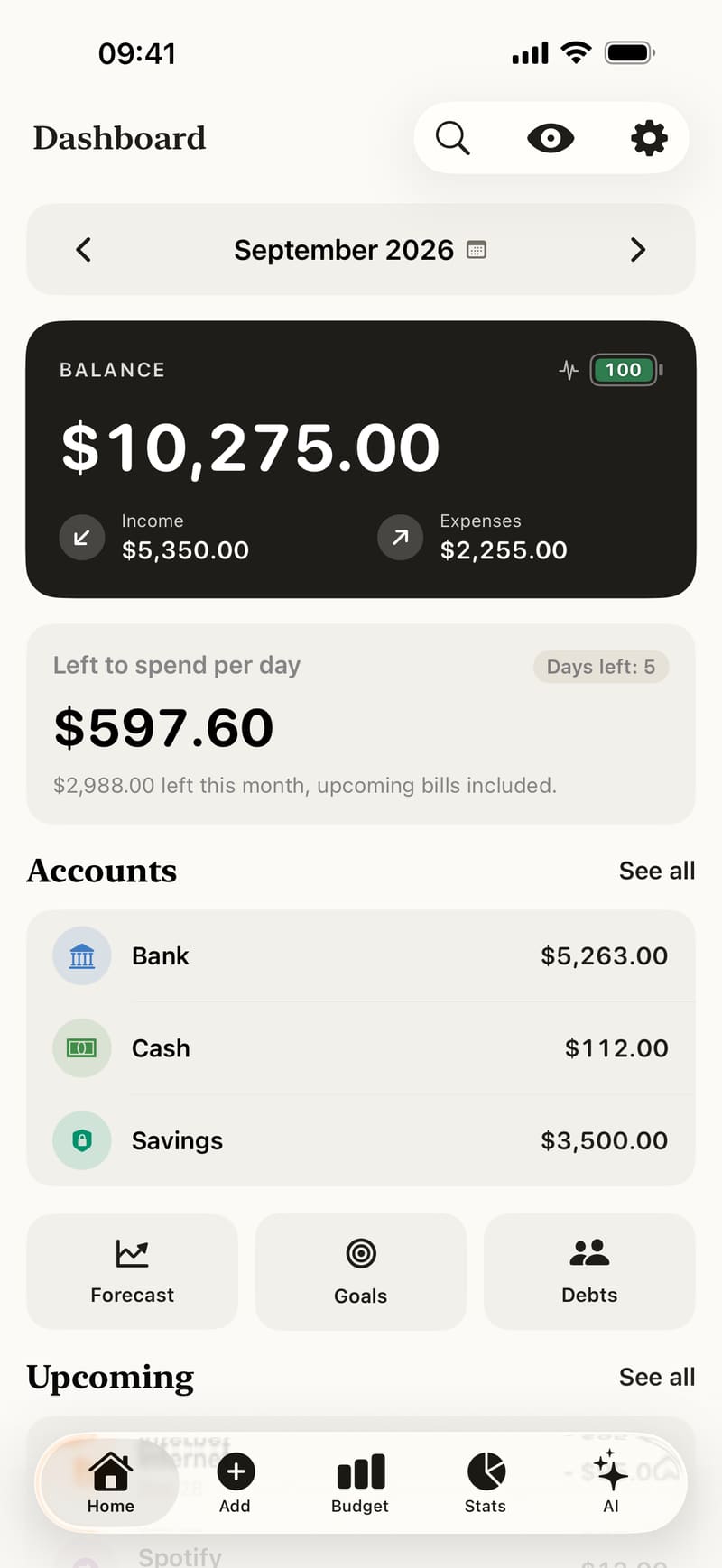
The dashboard now shows how much you can still spend each day until the end of the month. Fince takes this month's income, subtracts what you have spent and the recurring bills still to come, adds the income you are still expecting, and shares the rest over the days left, today included. If the month is already over budget, the card says so in red.
Next to the balance, a small gauge shows the Health Score of your month. Tap it to read what it means for you.
Accounts and transfers
Cash, bank, cards and savings each get their own balance, and moving money between them is a transfer rather than an expense. Your total balance is the sum of your accounts. See Accounts and transfers.
Bills that remind you
Add your rent, subscriptions and salary once. Fince lists what is due in the next seven days on the dashboard and, with notifications on, reminds you the day before. See Recurring bills.
Goals and debts
Savings goals follow a savings account and tell you how much to put aside each month to reach them on time. Debts keep track of what you owe and who owes you, with each repayment recorded. See Savings goals and Debts.
See next month coming
The forecast projects your balance 30, 60 or 90 days ahead from your recurring bills and income, and shows the lowest point before it happens. The calendar shows your month day by day. See Forecast and calendar.
Faster to use, everywhere
- Quick add: type “coffee 4.50” and Fince fills in the category and the amount.
- Widgets and Siri: add an expense from the Home Screen or by voice.
- Any currency, at the exchange rate you choose.
- Receipts, tags and search: attach a photo, label expenses, find anything.
Still private
There is still no bank login, no account and no ads. Your data stays on your iPhone, and iCloud sync is optional and goes to your own private iCloud. Only the AI chat, and weekly insights that can't be written on your iPhone, send data — the AI guide lists exactly what.
Free, and Premium if you want it
Accounts, bills, goals, debts, the forecast and up to 10 budgets are free. Premium adds unlimited budgets, unlimited AI chat and online insights, and CSV export, with a 7-day free trial.
New to Fince? Start with Getting started: it takes about two minutes.