How to find, track and cut your subscriptions
Go through two or three months of bank and card statements and list every charge that repeats. Ask of each one: would I sign up again today, at this price? Cancel, pause or downgrade what fails the test, watch free trials and annual renewals, and track what you keep as recurring bills so nothing renews by surprise.
Why subscriptions are easy to lose track of
A subscription is built to be forgotten. You decide once, and then it renews on its own, every month or every year, often on a card you rarely look at. Each one is small enough to feel harmless, and prices can change along the way. Nobody sets out to pay for five services and use two; it happens one sign-up at a time.
The goal is not to get rid of every subscription. Many are good value. The point is to keep only the ones you would choose again, knowingly.
Step 1: make the full list
Your memory is not a reliable list. Your statements are. Open the last two or three months of statements for every bank account and card you use, and note each charge that repeats. That catches the monthly ones; yearly charges need a longer look, so also search your email for words like "receipt", "renewal" and "subscription".
Don't forget the less obvious places:
- Subscriptions billed through an app store, which can appear on your statement under the store's name rather than the app's. On iPhone, those are listed in your Apple Account settings.
- Memberships: a gym, a club, a warehouse store.
- Add-ons to bills you already pay, like extra storage or a premium tier on a phone or internet plan.
- Services someone else pays for that you use, and the ones you pay for that someone else uses.
For each line, write the name, the price, how often it is charged and the next renewal date. Add up the monthly total, turning yearly charges into a monthly figure by dividing by 12. Seeing one number for all of them is often the most useful part of the exercise.
Step 2: the "would I sign up again today?" test
Go down the list and ask one question about each line: if I were not already paying for this, would I sign up for it today, at this price? Not "might I use it someday", and not "it's only a few dollars". Just: would I choose it again now?
The answers usually fall into three groups: a clear yes, a clear no, and "yes, but not like this". That last group is where a lot of the savings hide.
Step 3: cancel, pause or downgrade
- Cancel the clear no's right away, while you are motivated. Note the date the access ends, and check the next statement to make sure the charge stopped.
- Pause what you use in seasons. Some services let you pause; with others you can cancel and come back when you need them again: a streaming service for the one show you follow, a gym over the summer.
- Downgrade what you like but overpay for: a cheaper tier, a plan with ads, less storage, a student or family plan when you qualify and its terms allow sharing.
Rotating works well for streaming in particular: keep one service at a time and switch every month or two, instead of paying for several at once.
Monthly or annual?
Annual plans usually cost less per month, but you pay for the whole year up front and the renewal arrives as one large charge. A simple way to decide: choose annual only for something you have used steadily for months and are confident you will keep. For anything new or occasional, monthly keeps you free to leave.
Always compare the real numbers. Say a service costs $10 a month or $96 a year. Paying monthly for a year comes to $10 × 12 = $120. The annual plan costs $96, which is $8 a month, and saves $24 over the year. That is a good deal if you use it all year, and a poor one if you stop after four months: four monthly payments would have cost only $40.
Free trials: set the reminder before you start
A free trial usually turns into a paid plan unless you cancel in time. Before you start one, note the date it ends and set a reminder a day or two before. Some services let you cancel right away and keep access until the trial is over; when that is the case, cancelling on day one means you can decide later with nothing at stake.
Keep what you keep in view
Once the list is clean, the aim is to keep it that way. Treat each subscription like a bill: a known amount, on a known date, that you expect and can plan around. When they all sit together, with their total per month, the next creep is easy to spot. A new line on the list becomes a decision, not an accident.
Repeat the review once or twice a year; the second time is much faster. Whatever you free up can go to something you care about more, such as an emergency fund, or simply give your monthly budget more room.
How Fince helps
Fince does not read your bank statements, so step 1 is yours to do. Once you have the list, Fince keeps it in front of you:
- Add each subscription as a recurring bill, monthly or yearly, in the Subscriptions category. Fince sends a notification the day before each one is due, which is the right moment to cancel if you have changed your mind.
- For a free trial, add the first paid charge as a recurring bill on the day the trial ends. The reminder then arrives the day before you would start paying.
- Bills due in the next seven days appear under Upcoming on the dashboard.
- The forecast projects your balance 30, 60 or 90 days ahead from your recurring items and shows the lowest balance ahead, so a yearly renewal doesn't land on a tight week unnoticed.
- A monthly budget on the Subscriptions category alerts you at 80% and 100% if the total creeps past what you decided.
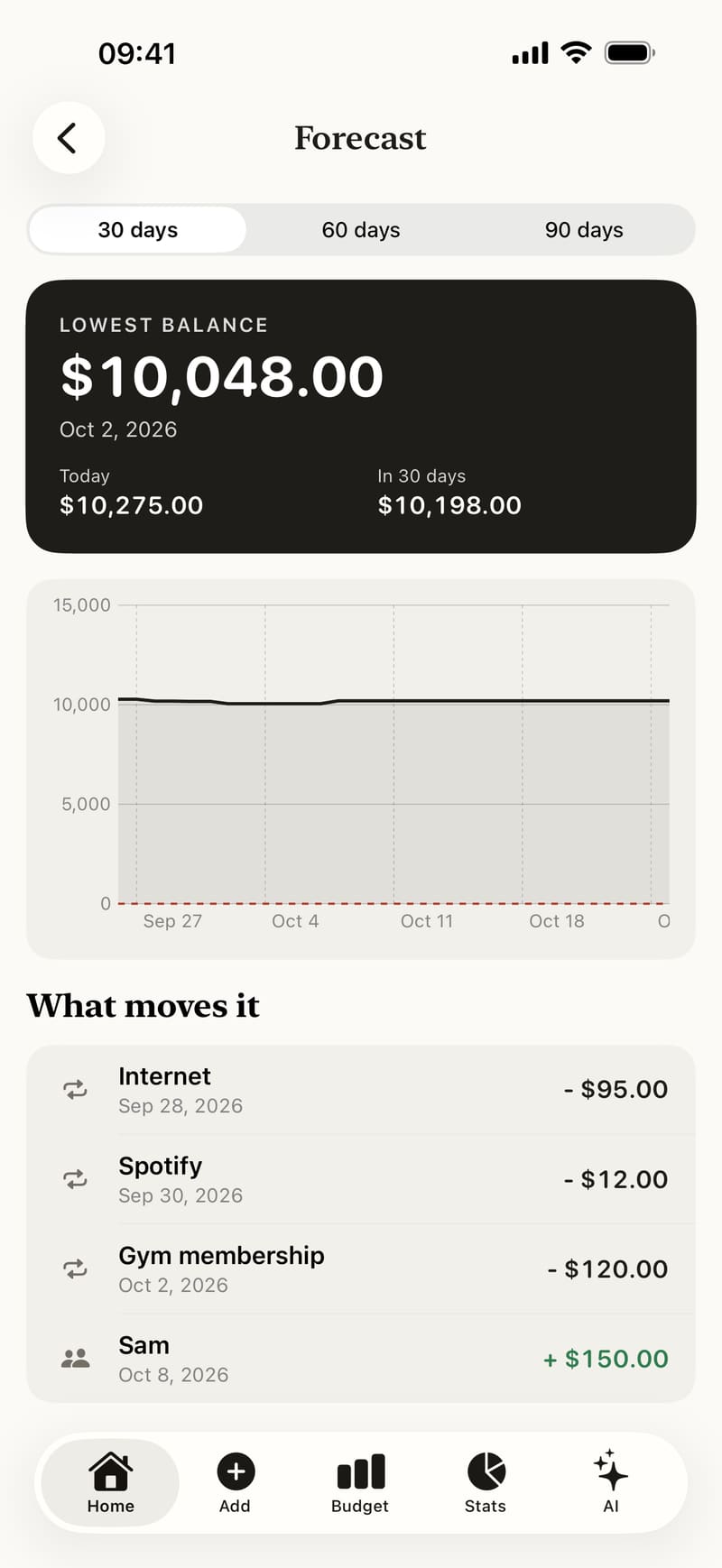
The recurring bills guide shows how to set one up, and the forecast and calendar guide explains the projection.